
Securing North-South Traffic in AKS Using Application Gateway, WAF and AGIC

TL;DR — Key Takeaways
- Ingress is a critical AKS security boundary because every internet-facing request passes through it before reaching Kubernetes workloads.
- Application Gateway, WAF and AGIC work together to provide Layer 7 routing, attack filtering and Kubernetes-native ingress configuration.
- Strong protection requires multiple layers, including end-to-end TLS, private services, restricted endpoints, health checks, logging and WAF prevention mode.
For many Kubernetes teams, the cluster itself receives most of the attention. Engineers spend time securing nodes, scanning container images, configuring RBAC and implementing workload identities.
While these controls are important, they often overlook one of the most exposed components in the entire platform — the ingress layer.
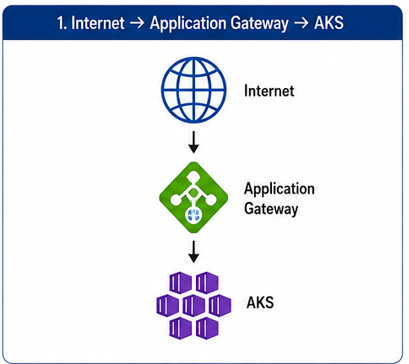
Every request originating from the internet enters through a north-south traffic path. Whether the application serves customer-facing APIs, mobile applications, partner integrations or internal portals, the ingress layer becomes the first line of defense.
A single misconfiguration at this layer can expose workloads, bypass security controls or create an attack surface large enough to affect the entire platform.
This article explores how Application Gateway, Web Application Firewall (WAF) and Application Gateway Ingress Controller (AGIC) can be combined to secure north-south traffic entering an AKS environment.
Understanding Traffic in Kubernetes
In Kubernetes environments, traffic generally falls into two categories:
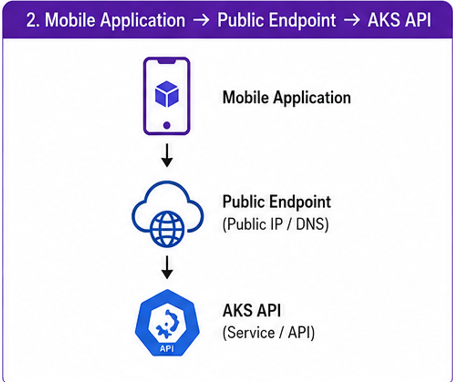
North-South Traffic: It is the Traffic That Enters or Leaves the Cluster. Examples:
or
- East-West Traffic: It is the traffic that moves internally between workloads. Example:
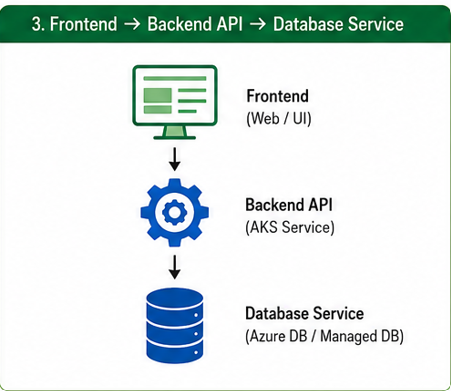
The focus of this article is north-south traffic because it represents the primary attack vector for externally exposed applications.
Why Traditional Load Balancing Isn’t Enough
Many organizations begin with a basic ingress architecture:
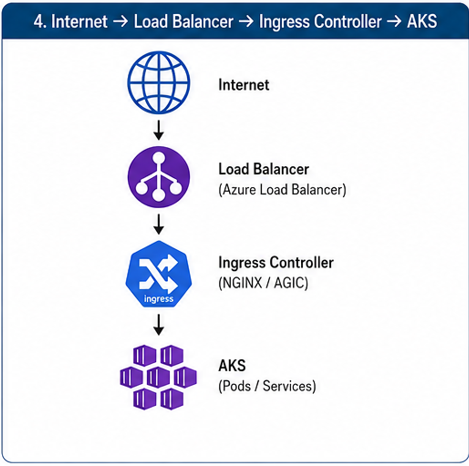
This approach provides traffic distribution but offers limited protection against:
- SQL injection
- Cross-site scripting (XSS)
- Bot traffic
- Layer 7 attacks
- Malicious payloads
- Protocol abuse
The load balancer simply forwards traffic. It does not inspect requests deeply enough to identify malicious behavior.
Introducing Application Gateway and WAF
Application Gateway operates as a Layer 7 load balancer capable of making routing decisions based on:
- Hostnames
- URL paths
- Headers
- Protocols
When WAF is enabled, Application Gateway gains the ability to inspect requests before they reach Kubernetes.
The architecture is as follows:
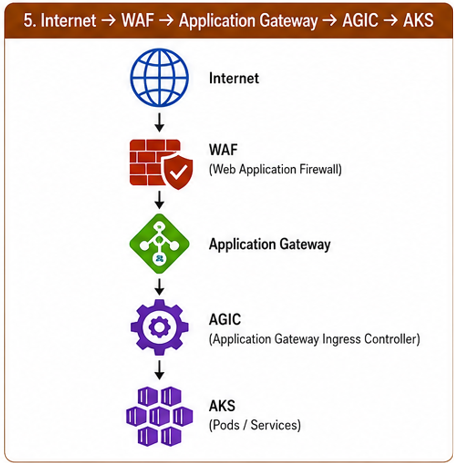
At this point, traffic is evaluated before the application ever receives it.
The Role of AGIC
A common misconception is that AGIC handles traffic forwarding. It does not. AGIC acts as a translator between Kubernetes and Application Gateway. It watches ingress resources and automatically updates Application Gateway configuration. For example:
apiVersion: networking.k8s.io/v1
kind: Ingress
metadata:
  name: payment-api
spec:
  ingressClassName: azure-application-gateway
AGIC converts this into:
- Back-end pools
- Routing rules
- Health probes
- HTTP settings
- Listeners
The conversion doesn’t require manual changes inside Application Gateway.
This allows platform teams to manage ingress declaratively through Kubernetes.
Layer 1: TLS Termination
One of the first security decisions is determining where TLS should terminate. Many environments terminate TLS at Application Gateway.
Client
    ↓ HTTPS
Application Gateway
    ↓ HTTP
AKS
While simple, this introduces risk because traffic travels unencrypted between Application Gateway and the back end.
A more secure model uses end-to-end encryption.
Client
    ↓ HTTPS
Application Gateway
    ↓ HTTPS
AKS
Benefits include:
- Encryption across the entire path
- Reduced exposure inside virtual networks
- Stronger compliance posture
- Improved protection against packet inspection
For sensitive workloads, end-to-end TLS should be considered the default design.
Layer 2: WAF Protection
WAF provides protection against common application attacks. Examples include:
SQL Injection
Attack:
' OR 1=1 --Without WAF:
Request reaches applicationWith WAF:
Request blocked before AKSCross-Site Scripting
Attack:
<script>alert('xss')</script>WAF can identify and block these requests before they reach back-end services.
Protocol Anomalies
Examples include:
- Invalid headers
- Malformed requests
- Suspicious payloads
- Known exploit signatures
Blocking these requests early reduces unnecessary workload processing.
Layer 3: Restricting Exposed Endpoints
One of the most common mistakes in AKS deployments is exposing everything. Examples include:
/swagger
/health
/metrics
/admin
These endpoints often contain valuable information for attackers. Hence, public exposure should be minimized.
Recommendations:
- Restrict administrative paths
- Protect management endpoints
- Disable unnecessary public routes
- Limit ingress rules to required services
The safest endpoint is the one that is never exposed.
Layer 4: Back-End Health Validation
Application Gateway continuously evaluates back-end health. This becomes an important security control. An unhealthy back end is automatically removed from routing decisions.
Benefits include:
- Preventing traffic to failed workloads
- Avoiding cascading failures
- Improving application availability
However, back-end probes must be designed carefully. A poorly configured probe can create an outage even when the application itself is healthy.
Health endpoints should:
- Return HTTP 200
- Avoid authentication requirements
- Respond quickly
- Avoid dependencies where possible
Layer 5: Restricting Network Exposure
Application Gateway should become the only approved entry point. A common design pattern is:
Internet
      ↓
Application Gateway
      ↓
Private AKS
In this model:
- Worker nodes remain private
- Services remain private
- Pods remain private
External users can only access workloads through Application Gateway. This significantly reduces the attack surface.
Logging and Threat Visibility
Security without visibility is incomplete. Every ingress layer should generate logs.
Application Gateway provides:
- Access logs
- Firewall logs
- Performance logs
Useful events include:
Blocked Requests
Rule Matches
Backend Failures
TLS Errors
Probe Failures
These logs help identify:
- Attack attempts
- Misconfigurations
- Reconnaissance activity
- Emerging patterns
Without logging, security incidents become much harder to investigate.
Common Security Mistakes
Exposing Internal Services
Not every service requires public access. Review ingress resources regularly.
Running WAF in Detection Mode Forever
Detection mode provides visibility and prevention mode provides protection.
Many environments never progress beyond detection mode.
Ignoring TLS Certificate Management
Expired certificates remain one of the simplest causes of production outages. Automate certificate life cycle management wherever possible.
Trusting Default Configurations
Default settings rarely align with production security requirements. Every deployment should undergo security review.
A Practical Security Checklist
Before exposing an AKS workload, verify:
- TLS is enabled
- Certificates are valid
- WAF is enabled
- WAF policies are reviewed
- Administrative endpoints are protected
- Health probes are configured correctly
- Back-end services remain private
- Application Gateway is the only public entry point
- Logging is enabled
- Security monitoring is operational
Final Thoughts
Securing north-south traffic is not a single configuration task. It is a layered approach that combines network controls, traffic inspection, encryption, visibility and operational discipline.
Application Gateway, WAF and AGIC work best when viewed as complementary components rather than individual solutions.
Application Gateway provides intelligent Layer 7 routing. WAF provides protection against common web attacks. AGIC provides operational consistency through Kubernetes-native configuration management. Together, they form a security boundary that protects workloads before requests ever reach the cluster.
For platform teams operating AKS in production, this ingress layer is often the most critical security control in the entire environment. A secure cluster behind an insecure ingress remains vulnerable. A properly secured ingress significantly reduces that risk.
Frequently Asked Questions
What does AGIC do in an AKS environment?
AGIC watches Kubernetes ingress resources and translates them into Application Gateway configuration, including listeners, routing rules, health probes and back-end pools.
Why use WAF in front of AKS?
WAF can detect and block attacks such as SQL injection, cross-site scripting, malicious payloads and protocol anomalies before requests reach Kubernetes workloads.
Should traffic remain encrypted between Application Gateway and AKS?
For sensitive workloads, yes. End-to-end TLS keeps traffic encrypted across the complete path and provides stronger security and compliance than terminating encryption only at the gateway.
