
AKS Is Growing – Along With Its Kubernetes Utilization Problem

AKS has become a major platform for enterprise Kubernetes workloads, and those workloads are getting more expensive. Organizations are running more compute, adding GPU infrastructure for AI, and expanding Kubernetes into more parts of their production environments.
The problem is that the infrastructure underneath all of this is being used remarkably inefficiently.

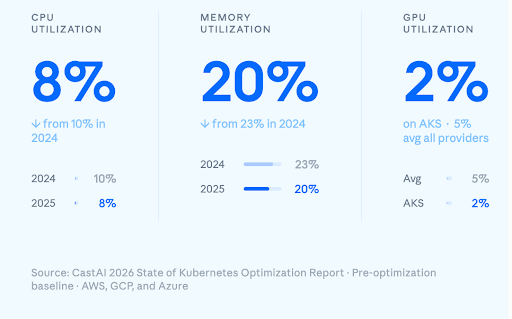
The 2026 State of Kubernetes Optimization Report makes the problem pretty hard to ignore. Utilization isn’t just low, it’s actually getting worse.
Across the Kubernetes clusters analyzed, average CPU utilization fell from 10% to 8% in 2025. Memory utilization dropped from 23% to 20%. At the same time, CPU overprovisioning jumped from 40% to 69%, while memory overprovisioning reached 79%.
And then there are GPUs.
Average GPU utilization across the report was just 5%.
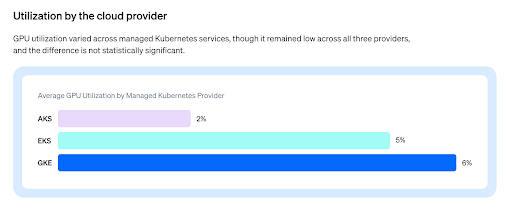
On AKS, it was 2%.
That is an extraordinary amount of expensive infrastructure sitting idle – amounting to 98 cents sitting idle, for every dollar spent.
The report is based on direct measurements from tens of thousands of Kubernetes clusters across AWS, Azure, and GCP, representing millions of compute resources. The data was collected before organizations enabled Cast AI automation, providing a baseline of how these environments were actually operating.
The obvious question is: if Kubernetes is supposed to make infrastructure more efficient, why is utilization getting worse as Kubernetes adoption grows?
Why Is Utilization Getting Worse? Well, GPUs for One
The GPU story is the most extreme example of a problem that exists across Kubernetes infrastructure.
AI workloads are uniquely difficult to size. Inference traffic can be highly variable, training workloads can have very different resource profiles, and GPU capacity is expensive enough that organizations are understandably cautious about releasing it. A workload may need significant capacity at peak and very little a few hours later.
Yet the traditional deployment model often gives that workload dedicated hardware anyway.
GPU sharing, time-slicing, and better scheduling can change that equation, but they remain far from universal. The result is that organizations can have substantial GPU capacity sitting idle while still provisioning enough infrastructure to handle the moments when demand arrives.
CPU and memory have a less dramatic price tag, but the underlying pattern is remarkably similar.
Resource requests are usually set when a workload is deployed. They are conservative because the consequences of requesting too little are obvious: throttling, OOM kills, failed scheduling, or an unhappy application team. Requesting too much rarely generates an immediate incident.
So the safe number becomes the permanent number.
A workload gets deployed with twice the resources it normally needs. Six months later, the workload has changed, but the request hasn’t. The same value gets copied into another environment, another Helm chart, or another service.
Kubernetes then does exactly what it is supposed to do. The scheduler treats the request as a requirement. Autoscaling responds to it. Nodes are provisioned to provide the requested capacity.
The infrastructure can therefore be correctly configured according to Kubernetes while still being badly matched to what the applications actually consume.
That’s what makes the overprovisioning numbers in the report particularly important. The problem isn’t simply idle CPU or memory. Organizations are building their infrastructure around resource requirements that are themselves inflated.
And once those assumptions become part of the platform, they are remarkably difficult to unwind manually.
This Isn’t Just an AKS Problem. It’s Across the Enterprise
The AKS numbers are striking, but they aren’t an Azure-specific problem.
The report found similarly low utilization across the major cloud providers, pointing to a broader problem with how enterprise Kubernetes infrastructure is provisioned and managed.
That distinction matters.
This isn’t a story about choosing AKS over EKS or GKE. It is a story about what happens after an organization has accumulated enough Kubernetes infrastructure that nobody can realistically keep every resource decision up to date by hand.
Enterprise environments are particularly good at accumulating these decisions.
A node pool created for last year’s traffic remains long after traffic patterns change. Resource requests written when an application launched stay in its deployment manifests. A commitment purchased against an earlier capacity profile continues to shape infrastructure spending.
Meanwhile, the workloads keep changing.
The report’s ARM numbers are a good example. ARM now accounts for about 9% of the CPU fleet, with ARM nodes growing 3.5 times faster than x86 since Q2 2024. That shift changes the economics of the underlying infrastructure, but taking advantage of it requires workloads and infrastructure configurations to evolve with it.
The same is true of Spot capacity, instance families, GPU scheduling, and node provisioning.
The optimal configuration is not static because the environment isn’t static.
That becomes increasingly difficult as Kubernetes expands across an organization. What might be a manageable optimization exercise for ten nodes becomes a very different problem across hundreds of nodes, multiple clusters, multiple teams, and multiple cloud accounts.
At that scale, small inefficiencies become infrastructure policy.
And infrastructure policy is very difficult to change manually.
The Problem Isn’t a Lack of Tools
Kubernetes has no shortage of tools for addressing individual pieces of this problem.
There are autoscalers for adding and removing pods and nodes. There are mechanisms for adjusting resource requests. There are ways to use Spot capacity, consolidate nodes, share GPUs, and take advantage of newer CPU architectures.
The problem is that none of these decisions exists in isolation.
Change the resource request for a workload and you change how it fits on a node. Change the node mix and you change which workloads can run on Spot. Change GPU allocation and you change the amount of physical GPU capacity required. Change the baseline workload footprint and the economics of your cloud commitments change with it.
This is why optimization tends to work well as a one-time exercise and then slowly deteriorate.
Someone spends a few weeks getting the cluster into good shape. Requests are adjusted. Nodes are consolidated. A few workloads move to cheaper capacity.
Then the environment changes.
New services arrive. Traffic increases. Other workloads disappear. Instance prices change. Teams deploy new versions with different resource requirements.
Six months later, the cluster may still be running the same optimization configuration even though almost everything around it has changed.
The report’s findings suggest that this isn’t an edge case. It’s the normal operating model.
What Should AKS Teams Do?
The good news is that fixing the problem doesn’t require replacing AKS or redesigning applications. But it does require changing the way infrastructure efficiency is managed.
For teams responsible for an AKS environment, the first questions should be:
- Do we know what our workloads actually use?
Pro tip: Start with real CPU, memory, and GPU consumption rather than relying on the requests currently sitting in deployment manifests. The difference between those two numbers is where much of the optimization opportunity starts.
- Are resource requests still representative?
Pro tip: Requests shouldn’t be treated as permanent configuration. A workload that has changed should have its resource requirements changed with it.
- Are we provisioning infrastructure around workload requirements or around historical assumptions?
Pro tip: Fixed node pools can make sense for some workloads, but dynamic provisioning gives teams more flexibility to match infrastructure to what is actually running.
- Which workloads need on-demand capacity?
Pro tip: Not every workload needs it. Batch processing, suitable stateless services, CI workloads, and some machine learning workloads can often tolerate interruption and make effective use of Spot capacity.
- Are GPUs being used efficiently?
Pro tip: If GPUs are spending most of their time idle, adding more hardware isn’t the obvious answer. Sharing, scheduling, consolidation, and better workload placement can change the amount of physical capacity required.
- Are cloud commitments based on the right baseline?
Pro tip: Commitments can lower the cost of predictable capacity, but they should be considered after the underlying workload footprint has been optimized. Otherwise, organizations risk committing to infrastructure they don’t actually need.
These decisions compound. Rightsizing can reduce the amount of infrastructure required. Better provisioning can improve how that infrastructure is packed. Spot can lower the cost of workloads that don’t require guaranteed capacity. Better GPU utilization can reduce the number of GPUs required in the first place.
The challenge is keeping all of those decisions aligned as the environment changes.
Next in the Series: GKE and EKS
AKS is where this series starts, but the utilization problem doesn’t stop at Azure. The report found similarly low utilization across all three major cloud providers, which raises the same questions for teams running GKE and EKS.
In the next post, we’ll look at what the 2026 State of Kubernetes Optimization Report found for GKE and for EKS on AWS. That includes CPU and memory utilization, overprovisioning, and GPU usage, and how those environments compare with what we’ve seen on AKS.
P.S. Fixes under the hood.
If you want to learn more about the harder question of what to actually change in an AKS cluster, we dove into practical AKS cost optimization in this post. It covers the mechanics behind the decisions above: when Node Auto Provisioning makes more sense than Cluster Autoscaler, how workload rightsizing interacts with HPA and VPA, where Spot fits, how consolidation affects availability, and which Kubernetes configuration details can determine whether an optimization strategy actually saves money or simply moves the waste somewhere else.
