
Kubernetes Architecture Made Simple: A School Analogy

Understanding Kubernetes can be overwhelming, much like stepping into a new school for the first time. There are administrators, teachers, classrooms and students — all working together in an organized system. Kubernetes functions similarly, efficiently orchestrating containerized applications.
In this beginner-friendly guide, we’ll use the school analogy to explain the Kubernetes architecture in a simple, relatable way. By the end, you’ll understand how the Control Plane (administration) and Worker Nodes (classrooms) work together to keep applications running smoothly.

Kubernetes Architecture Overview — The School Model
At a high level, a Kubernetes cluster is like a school with two key sections:
- Control Plane (Administration): The brain of the cluster, making decisions and ensuring everything runs smoothly
- Worker Nodes (Classrooms): Where the actual learning (application workloads) happens, under the supervision of teachers
Key Analogy Components
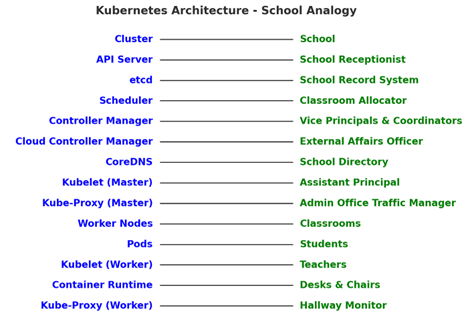
Control Plane: The School Administration
The Control Plane is like the principal’s office, ensures that everything in the school (cluster) operates efficiently.
1. API Server — The School Receptionist
- Handles all requests and directs them to the right department
- Ensures only valid changes are made to the school records
Kubernetes Role: Processes all API requests and manages communication between components
2. Scheduler — The Classroom Allocator
- Assigns students (pods) to classrooms (worker nodes) based on availability
- Ensures no classroom is overcrowded
Kubernetes Role: Determines which worker node runs each pod based on the available resources
3. Controller Manager — The Vice Principal and Coordinators
- If a teacher (node) is absent, a substitute is assigned
- Ensures that students (pods) maintain order and are always present
Kubernetes Role: Oversees replication, node health and automatic workload adjustments
4. Cloud Controller Manager — The External Affairs Officer
- Handles external operations such as bus schedules, power supply and internet connectivity
- Ensures resources from external sources (cloud services) are available
Kubernetes Role: Integrates Kubernetes with external cloud providers
5. etcd — The School Record System
- Maintains records of all students, schedules and assignments
- If there’s any confusion, the administration refers to the record system
Kubernetes Role: A distributed key-value store that holds the cluster’s entire state
6. CoreDNS — The School Directory
- Helps students find the right classrooms or labs
- Ensures smooth navigation within the school
Kubernetes Role: Resolves service names, allowing pods to find and communicate with each other
7. Kubelet (on the Master Node) — The Assistant Principal
- Monitors the administration to ensure all office processes are running efficiently
- Reports back if anything is malfunctioning
Kubernetes Role: Ensures that critical system components in the Control Plane are operational
8. Kube-Proxy (on the Master Node) — The Admin Office Traffic Manager
- Ensures communication between different school departments
- Manages how messages (network traffic) flow within the administration
Kubernetes Role: Handles networking rules inside the Control Plane
Worker Nodes: The Classrooms and Teachers
Worker nodes are where students (applications) learn and complete assignments under teacher supervision.
1. Pods — The Students
- Each student (pod) has their own desk (container) where they work
- Some students work alone, while others collaborate in groups
Kubernetes Role: The smallest deployable unit, running containerized applications
2. Kubelet — The Teacher
- Ensures students (pods) are in class and completing their assignments
- Reports back to the principal’s office (Control Plane) if a student is missing
Kubernetes Role: Manages and ensures pods are running on each worker node
3. Kube-Proxy — The Hallway Monitor
- Ensures smooth movement between classrooms
- Prevents communication breakdowns and enforces rules
Kubernetes Role: Manages network traffic inside the cluster, ensuring pods communicate efficiently
4. Container Runtime — The Desks and Chairs
- Provides students (applications) with a place to work
- Without desks and chairs, students cannot complete their assignments
Kubernetes Role: Runs containers inside pods, enabling application execution
How Components of Kubernetes Work Together
Consider deploying a new application in Kubernetes:
- The School Board (User/Developer) requests a new course (application).
- The Principal’s Office (API Server) logs the request.
- The Scheduler finds an available classroom (worker node) for the new students (pods).
- The Controller Manager ensures the right number of students (pods) are always present.
- The Teacher (Kubelet) runs the lesson (application) and ensures students are completing their work.
- The Hallway Monitor (Kube-Proxy) ensures students can move between classes and interact.
This automated process ensures that applications (students) run smoothly without manual intervention.
Conclusion — Bringing it all Together
- The Control Plane acts as the school administration, making high-level decisions.
- The Worker Nodes function as classrooms, where applications (students) are taught.
- Kubelet, Kube-Proxy and the Container Runtime manage student activities within each classroom.
- Networking and DNS (Kube-Proxy and CoreDNS) ensure smooth communication between different classrooms.
This analogy simplifies Kubernetes architecture for beginners, making it easier to understand how the system functions in an organized manner.
