
Building AI Agents Using Open-Source Docker cagent and GitHub Models

If you’re tired of wrestling with AI development workflows, here’s some refreshing news: Docker has introduced an open-source framework called cagent that transforms how AI agents are built and orchestrated. Think of it as an AI development Swiss Army Knife that eliminates the headaches of managing Python setups, juggling between different SDK versions and writing endless orchestration code.
In this article, we’ll explore leveraging cagent alongside GitHub Models to achieve genuine vendor flexibility. We’ll build a practical podcast-generation system powered by specialized AI sub-agents, then show you how to package and share your creation via Docker Hub. The goal? Freedom from vendor lock-in while maintaining production-grade quality and cost efficiency.

Understanding the cagent Framework
At its heart, cagent represents Docker’s answer to the complexity of AI agent orchestration. This open-source runtime lets you define intelligent agent behaviors using straightforward YAML configuration files. Forget about environment-specific issues — just write your configuration and execute with a simple cagent run command.
What Makes cagent Stand Out?
- YAML-Driven Configuration: Everything your agent needs is contained in one declarative file — model settings, instructions, tool permissions and sub-agent coordination rules.
- Provider Flexibility: Seamlessly work with OpenAI, Anthropic, Google Gemini or Docker Model Runner (DMR) for on-device inference.
- Model Context Protocol (MCP) Support: Connect external tools and services through Stdio, HTTP or SSE protocols.
- Registry-Based Distribution: Share your agents securely using Docker Hub’s proven container infrastructure.
- Cognitive Capabilities: Built-in ‘think’, ‘to do’ and ‘memory’ functions enable sophisticated reasoning workflows.
The philosophy is simple: You describe your agent’s purpose and cagent manages the execution. Each agent operates within its own context bubble, equipped with specialized tools such as MCP and you can also delegate responsibilities to sub-agents. This creates organizational hierarchies that mirror exactly how humans work.
Exploring GitHub Models
GitHub Models is a suite of developer tools that take you from AI conception to deployment. It includes a model catalog, prompt management and quantitative evaluations. GitHub Models provides rate-limited free access to production-grade language models from OpenAI (GPT-4o, GPT-5, o1-preview), Meta (Llama 3.1, Llama 3.2), Microsoft (Phi-3.5) and DeepSeek models. The advantage with GitHub Models is that you need to authenticate only once via GitHub Personal Access Tokens and you can plug and play any models of your choice supported by GitHub Models.
You can navigate to GitHub Marketplace to see the list of all the supported models. Currently, GitHub supports all the popular models, with the list continuing to grow. Recently, Anthropic Claude models were also added.
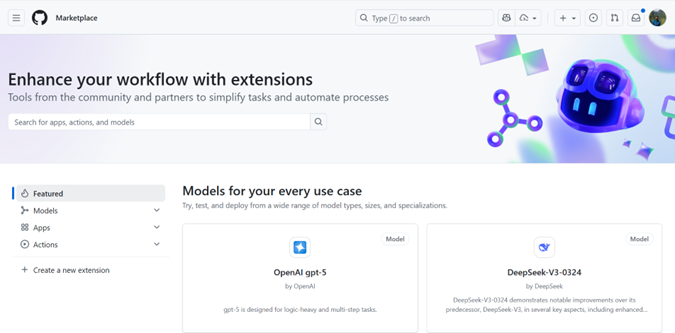
GitHub has designed its platform, including GitHub Models and GitHub Copilot agents, to support production-level agentic AI workflows, offering the necessary infrastructure, governance and integration points. GitHub Models employs a number of content filters. These filters cannot be turned off as part of the GitHub Models experience. If you decide to employ models through Azure AI or a paid service, please configure your content filters to meet your requirements.
To get started with GitHub Models, visit the quick-start guide, which contains detailed instructions.
Connecting cagent With GitHub Models
Integration between GitHub Models and cagent is remarkably straightforward thanks to GitHub’s OpenAI-compatible API. Simply configure cagent to treat GitHub Models as a custom OpenAI provider by adjusting the base URL and authentication credentials.
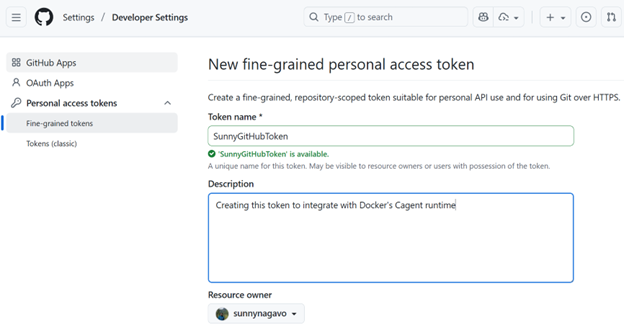
Let’s build something practical — a Podcast Generator agent utilizing GitHub Models. We’ll demonstrate how effortlessly you can deploy and distribute AI agents through Docker Hub. It is necessary to create a fine-grained personal access token by navigating to this URL.
Prerequisites
- Docker Desktop 4.49+ with MCP Toolkit enabled
- GitHub Personal Access Token with models scope
- Download cagent binary from the repository. Place it inside the folder C:\Dockercagent. Run .\cagent-exe –help to see more options.
Building a Podcast-Generation Agent
The podcast generator I created during early cagent testing demonstrates multi-agent orchestration. This agent transforms blogs, articles or YouTube videos into podcast content through coordinated sub-agent collaboration.
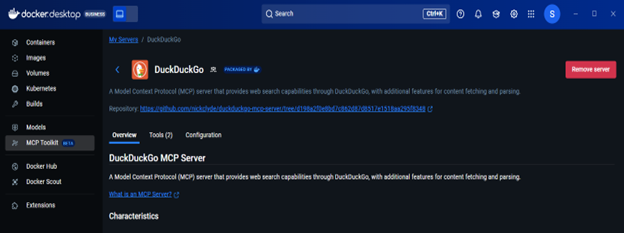
The configuration file below illustrates a sophisticated workflow combining GitHub Models with MCP tools (specifically DuckDuckGo) for external data retrieval. The DuckDuckGo MCP server operates within an isolated Docker container managed through the MCP gateway. For a deeper understanding of Docker MCP servers and the MCP Gateway, consult the official documentation.
The agent architecture employs sub-agents: [“researcher”, “scriptwriter”] to establish a hierarchical structure where domain experts manage specialized tasks.
sunnynagavo55_podcastgenerator.yaml
#!/usr/bin/env cagent run
agents:
root:
description: “Podcast Director – Orchestrates the entire podcast creation workflow and generates text file”
instruction: |
You are the Podcast Director responsible for coordinating the entire podcast creation process.
Your workflow:
- Analyze input requirements (topic, length, style, target audience)
- Delegate research to the research agent, who can open DuckDuckGo browser for researching
- Pass the researched information to the scriptwriter for script creation
- Output is generated as a text file, which can be saved to file or printed out
- Ensure quality control throughout the process
Always maintain a professional, engaging tone and ensure the final podcast meets broadcast standards.
model: github-model
toolsets:
– type: mcp
command: docker
args: [“mcp”, “gateway”, “run”, “–servers=duckduckgo”]
sub_agents: [“researcher”, “scriptwriter”]
researcher:
model: github-model
description: “Podcast Researcher – Gathers comprehensive information for podcast content”
instruction: |
You are an expert podcast researcher who gathers comprehensive, accurate and engaging information.
Your responsibilities:
– Research the given topic thoroughly using web search
– Find current news, trends and expert opinions
– Gather supporting statistics, quotes and examples
– Identify interesting angles and story hooks
– Create detailed research briefs with sources
– Fact-check information for accuracy
Always provide well-sourced, current and engaging research that will make for compelling podcast content.
toolsets:
– type: mcp
command: docker
args: [“mcp”, “gateway”, “run”, “–servers=duckduckgo”]
scriptwriter:
model: github-model
description: “Podcast Scriptwriter – Creates engaging, professional podcast scripts”
instruction: |
You are a professional podcast scriptwriter who creates compelling, conversational content.
Your expertise:
– Transform research into engaging conversational scripts
– Create natural dialogue and smooth transitions
– Add hooks, sound bite moments and calls-to-action
– Structure content with clear intro, body and outro
– Include timing cues and production notes
– Adapt tone for target audience and podcast style
– Create multiple format options (interview, solo, panel discussion)
Write scripts that sound natural when spoken and keep listeners engaged throughout.
toolsets:
– type: mcp
command: docker
args: [“mcp”, “gateway”, “run”, “–servers=filesystem”]
models:
github-model:
provider: openai
model: openai/gpt-5
base_url: https://models.github.ai/inference
env:
OPENAI_API_KEY: ${GITHUB_TOKEN}
Important: Make sure to install the DuckDuckGo MCP server from Docker Desktop’s MCP catalog before running this agent.
Running Your Agent Locally
Make sure that you update your GitHub PAT and use the following command to run your agent from the root folder where your cagent binaries reside:
cagent run ./sunnynagavo55_podcastgenerator.yaml
Distributing Your Agent as a Docker Image
Run the following command to push your agent as a Docker image to your favorite registry to share it with your team:
cagent push Sunnynagavo55/Podcastgenerator
You can see your published images inside your repositories as shown below.
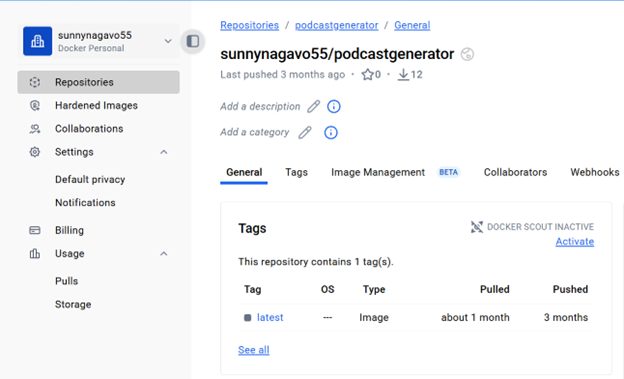
Congratulations! Now we have our first AI agent created using cagent and deployed to Docker Hub.
Retrieving Your Agent as a Docker Image on a Different Machine
Run the command provided below to pull the Docker image agent created by your teammate. Running this command gets you the agent YAML file, saving it in the current directory.
cagent pull Sunnynagavo55/Podcastgenerator
Alternatively, you can run the same agent directly without pulling the image by using the following command:
cagent run Sunnynagavo55/Podcastgenerator
Note: The abovementioned Podcastgenerator example agent has been added to the Docker/cagent GitHub repository under the examples folder. Give it a try and share your experience.
Conclusion
Traditional AI development imprisons you within provider ecosystems — managing separate API keys, juggling multiple billing accounts and navigating proprietary SDKs. The cagent-GitHub Models combination removes these barriers by uniting Docker’s declarative framework with GitHub’s unified model marketplace. One GitHub Personal Access Token unlocks models from OpenAI, Meta, Microsoft, Anthropic and DeepSeek, eliminating credentials management overhead.
Modern AI development isn’t about vendor commitment — it’s about building adaptable systems that evolve alongside the landscape, accommodate emerging models and flex with changing business needs. GitHub Models and cagent deliver this architectural freedom right now.
Why wait? Begin your cagent journey with GitHub Models today and share your innovations with the community.
