
Build and Orchestrate Agents Using Docker cagent

cagent is the new open-source framework from Docker that makes running AI agents seamless and lightweight. With cagent, you can start with simple Hello World agents and scale all the way to complex, multi-agent processing workflows. It provides core agent capabilities such as autonomy, reasoning and action execution, while also supporting the model context protocol (MCP), integrating with Docker model runner (DMR) for multiple LLM providers and simplifying agent distribution through the Docker registry.
Unlike traditional agentic frameworks that treat AI agents as programmatic objects requiring extensive Python or C# code, cagent incorporates a declarative, configuration-first philosophy. So, instead of managing complex dependencies and writing custom orchestration logic, developers define their agent’s persona and capabilities within a single, portable YAML file, effectively decoupling logic from the underlying infrastructure.

However, this simplicity comes with the trade-off that cagents excel at rapid deployment and standardized tasks, sacrificing granular programmatic control found in the traditional agentic frameworks. In other words, cagent is designed for portability and execution speed, whereas LangGraph or AutoGen is built for architectural flexibility and complex reasoning loops.
Prerequisites for Docker cagent
To start using cagent, you’ll need Docker Desktop 4.49 or later. If you’re using Docker Engine without Docker Desktop, you can install cagent directly using your operating system’s package manager.
On macOS, install the cagent using Homebrew:
`brew install agent`
On Windows, you can install it using WinGet:
`winget install Docker.cagent`
To verify the cagent installation, run the following command.
`cagent version`
Building Your First Agent Using Docker cagent
As part of this example, we will define a specialized Technical Writer agent using the openai/gpt-4o model.
Write the following configuration to an `assistant.yaml` file.
“`
version: “1” agents:
root:
model: openai/gpt-4o
description: “A professional technical writer who simplifies complex DevOps topics.” instruction: |
You are an expert technical writer.
Your goal is to explain technical concepts clearly and concisely.
Always use Markdown for formatting and include code snippets where relevant.
“`
Set your API key:
`export OPENAI_API_KEY=your_key_here` Execute the cagent run command.
`cagent run assistant.yaml`
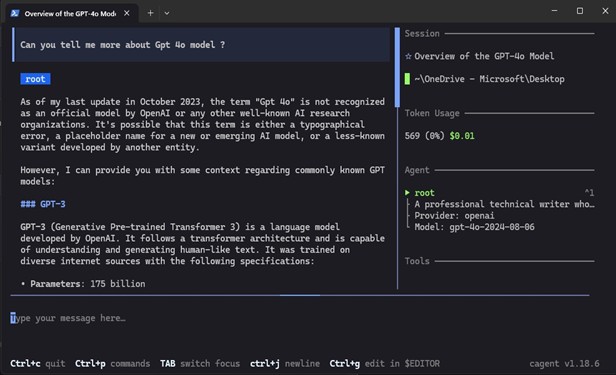
Once running, you can chat with your agent in the terminal. It’s now a specialized containerized assistant ready for work.
Using cagent With MCP
MCP is an open-source standard designed by Anthropic to connect agents with real-world entities, such as databases, search engines and APIs.
For this example, we will build a Gemini Expert agent responsible for searching and retrieving the Gemini API documentation using the Gemini MCP tool.
First, define the gemini_expert.yaml file.
“`
version: “1” agents:
root:
model: anthropic/claude-3-5-sonnet # High reasoning model for complex docs description: “Technical specialist for Google Gemini API and SDKs.” instruction: |
You are a Gemini API specialist. When a user asks how to implement a feature (like context caching or multimodal input), use the
‘gemini-api-docs’ tools to:
- Search for relevant documentation entries.
- Retrieve code snippets and implementation guides.
- Explain the best practices based on the fetched docs. toolsets:
– type: mcp
ref: docker:gemini-api-docs # Reference the server from the Docker Hub MCP catalog
“`
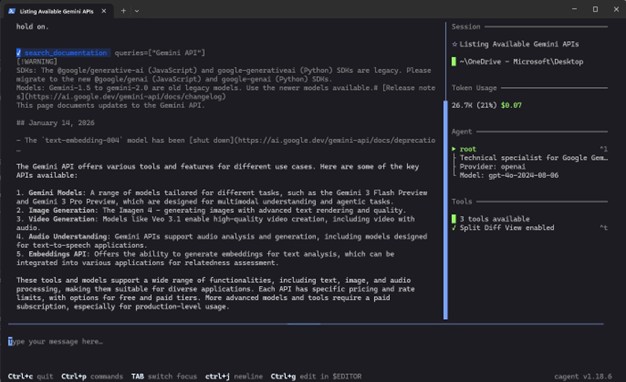
Once we execute the run cagent run gemini_expert.yaml command, you will see cagent using the Gemini MCP server to list APIs available in the documentation.
Here, the toolset is what we will use to define the MCP server. Examples of some other toolsets available are filesystem to work with files and directories, shell to execute commands, think for reasoning and memory to store and retrieve information across conversations and sessions.
Multi-Agent Workflows With cagent
Now, let’s see how we can use the Gemini API documentation agent along with a technical writer agent to come up with some steps on how a Project Manager can build a simple agent using the Gemini API.
We will call this `multi-agent.yaml`.
“`
version: “1” agents:
root:
model: openai/gpt-4o
description: “Project Manager for AI Integration guides.” instruction: |
You are the Project Manager. Your goal is to explain how to build an agent using the Gemini API.
- Ask the ‘researcher’ to find the specific Gemini API methods for “System Instructions” and “Tool Use.”
- Send the researcher’s findings to the ‘writer’.
- Ensure the final blog post includes a clear code example discovered by the researcher.
sub_agents:
- researcher
- writer
researcher:
model: openai/gpt-4o-mini
description: “Gemini Documentation Specialist.” instruction: |
You gather technical specifications from the Gemini API documentation. Focus on finding:
- How to initialize the model
- How to pass ‘system_instruction’ to an agent
- The syntax for ‘tools’ (function calling) toolsets:
- type: mcp
ref: docker:gemini-api-docs # This connects directly to Google’s structured docs
writer:
model: openai/gpt-4o
description: “Technical Content Creator.” instruction: |
You take technical research notes and turn them into a polished blog post. Explain the Gemini API implementation in a way that a developer can follow. Always include a Python or Node.js snippet based on the researcher’s data.
“`
- The root (manager) is the only agent that talks to the user. It is responsible for orchestration by breaking the tasks and assigning them to the right specialists.
- The sub-agents (specialists) are hidden from users and only speak when the root calls them.
So, when executing the above YAML configuration, the root agent coordinates the workflow by delegating research and writing tasks to its specialized sub-agents and consolidating their outputs into a single, user-facing response.
Finally, if you would like to share the agent with the broader community, push the configuration to Docker Hub just like a container image:
`cagent push .multi-agent.yaml your-username/tech-team:v1`
Conclusion
Docker cagent simplifies building and running AI agents by adopting a configurationfirst approach. It removes the friction of manual orchestration and complex coding patterns, enabling rapid development. With its support for a variety of tools and models, it allows you to build a resilient, vendor-agnostic AI stack.
