
A Missing Binary Turned a Kubernetes Liveness Probe Into a Restart Loop

TL;DR — Key Takeaways
- A Kubernetes exec-based liveness probe failed because the slim Node.js runtime image did not include
pgrep, causing a healthy Redis worker to restart repeatedly. - Replacing the process check with
/healthmade liveness reflect whether the Node.js process could respond, while/readyseparately checked Redis availability. - Readiness can mark a Pod as not ready, but it cannot stop a worker that pulls jobs directly from Redis; queue draining must be handled by the application itself.
A background Node.js worker pulled jobs from Redis. It exposed no HTTP route because it never served user traffic. An early Kubernetes liveness check used an exec probe that effectively ran:
livenessProbe:
exec:
command: [“pgrep”, “-f”, “server/worker”]

The slim runtime image did not contain pgrep. The kubelet could not run the check, so it treated each attempt as a liveness failure and restarted a worker that had been consuming jobs normally. Repeated restarts eventually put the container into CrashLoopBackOff.
Installing pgrep would have made the command run, but the probe still asked a weak question.
A Process Match Couldn’t Prove That Jobs Were Moving
pgrep can tell you whether a matching process exists. It cannot tell you whether that process can reach Redis, receive a job or make progress on work already in flight.
That gap mattered here. The container started the worker through npm run worker, so a process check could have detected a missing child process. It could not distinguish normal queue consumption from a live process with a stuck connection.
The replacement added a small HTTP server inside the worker. It listened on a pod-only health port that no Kubernetes Service exposed.
if (req.url === “/health”) {
return send(200, {
status: “ok”,
workers: getWorkerCount(),
uptime: process.uptime(),
});
}
/health deliberately avoided Redis. A response showed that the Node.js event loop could accept an HTTP request and return data. The worker count showed how many worker objects the process had created. It did not claim that those workers were processing jobs.
This made the liveness action safer. A Redis outage should not trigger an extra container restart unless restarting can repair the fault. If every worker ties liveness to the same dependency, one Redis incident can create a second incident through simultaneous restarts.
Readiness Checked Redis, but it Didn’t Pause the Queue
The second endpoint performed a live Redis ping with a two-second timeout:
const pong = await Promise.race([
redis.ping(),
new Promise((_, reject) =>
setTimeout(() => reject(new Error(“redis ping timeout”)), 2000),
),
]);
return pong === “PONG”
? send(200, { status: “ready” })
: send(503, { status: “not-ready” });
The manifest connected /health to liveness and /ready to readiness:
livenessProbe:
httpGet: { path: /health, port: health }
periodSeconds: 30
timeoutSeconds: 5
failureThreshold: 3
readinessProbe:
httpGet: { path: /ready, port: health }
periodSeconds: 30
timeoutSeconds: 5
failureThreshold: 3
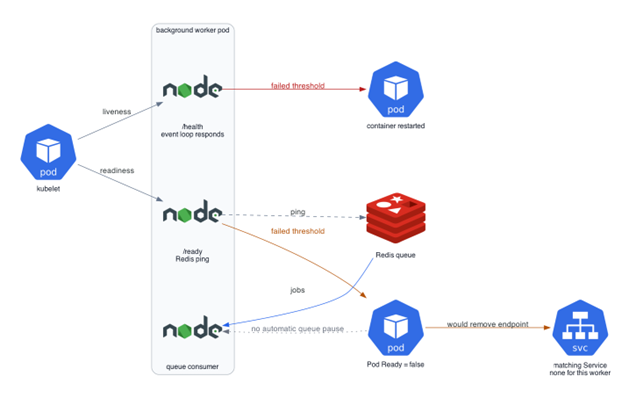
Figure 1: Liveness Controls Container Restarts; Readiness Controls Pod Status and Service Endpoints
Kubernetes keeps a container running when readiness fails and sets the Pod’s Ready condition to false. It also removes that Pod from every matching Service endpoint. Those rules work naturally for an HTTP application that receives traffic through a Service.
This worker had no Service. It pulled jobs directly from Redis. A failed readiness probe therefore made the Redis problem visible in Pod status and could affect rollout status, but it did not stop the queue consumer from receiving work. Kubernetes does not connect Service readiness to an external queue’s consumer life cycle.
If a background worker must stop taking new jobs, the application or queue library must pause or close the consumer. The readiness endpoint can report that state, but it cannot create it.
Shutdown Ordering Showed the Same Boundary
The shutdown path called the health server first, then stopped the workers and finally closed Redis:
health.close();
await stopWorkers();
await closeRedis();
That order expresses the right intent, but health.close() uses a callback API and the code did not wait for its completion. It also could not make Kubernetes drain a queue that bypassed Services. The control that mattered was stopWorkers(), which the code awaited before closing Redis.
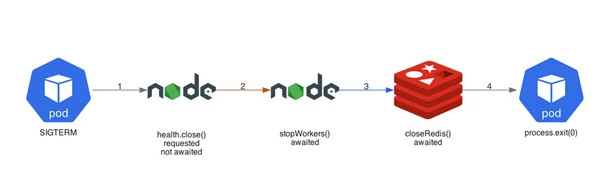
Figure 2: Shutdown Handler Waits for Queue Layer and Redis, not HTTP Server Callback
Tests That Catch This Before Release
- Run every exec probe inside the exact runtime image, not in a development shell.
- Break Redis and confirm that /ready returns 503 while /health remains 200.
- Confirm that a Redis outage changes Pod readiness without increasing the restart count.
- If readiness should stop job intake, test queue consumption directly. Pod status alone cannot prove it.
- Send SIGTERM with a job in progress and verify the queue shutdown rather than inferring it from the order of method calls.
The HTTP liveness endpoint removed a hidden dependency on an image utility. The Redis readiness endpoint added a useful status signal. The remaining lesson came from the workload itself: A background consumer needs an application-level drain because Kubernetes readiness governs Service traffic, not arbitrary sources of work.
Frequently Asked Questions
Why did the worker enter CrashLoopBackOff?
The liveness probe depended on pgrep, which was not present in the slim runtime image. Kubernetes treated the failed command as a liveness failure and repeatedly restarted the otherwise functioning worker.
Why should Redis not necessarily be part of a liveness check?
A Redis outage is an external dependency failure that restarting the worker may not fix. If every worker restarts when Redis fails, the probe can amplify one dependency outage into a broader operational problem.
Does Kubernetes readiness stop a Redis worker from consuming jobs?
No. Readiness controls Pod status and Kubernetes Service endpoints. A worker pulling jobs directly from Redis bypasses those Service endpoints, so the application or queue library must explicitly pause or stop consumption.
